
Trusted by 17,000+ professionals
Bringing trace precedents and other powerful features into Sheets

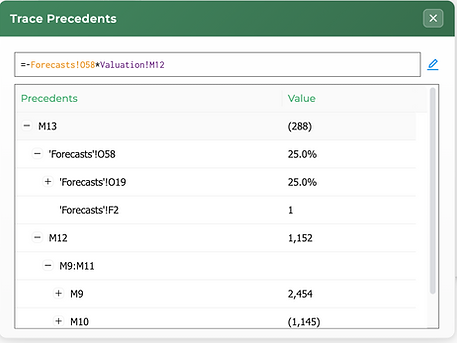
Trace Precedents
See all the cells referenced in your formula in one view

What If Analysis
Quickly compare scenarios to understand how changes impact outcomes
.png)
Font Color Cycle
Apply custom font colors to selected data
.png)
Auto-Color Selection
Find and highlight hardcoded values in your analysis
.png)
Trace Dependents
See all the cells that reference the selected cell

Add / Remove Filters
Instantly add or remove filters to analyze information faster
.png)
Fill Color Cycle
Apply fill colors to selected cells

Goal Seek
Find the exact input needed to reach any target value
.png)
Number Cycle
Apply custom number formats to selected cells quickly

Export Selection as Image
Export Google Sheet outputs as images to Slides or Docs, retaining formatting
.png)
Customizable Shortcuts
Change any shortcut to one that works for you
PLUS
.png)
All Key Excel Shortcuts on Google Sheets, Including:
-
Insert / Delete Columns & Rows
-
Paste Special (Formulas, Values, Formatting, etc.)
-
All Border Shortcuts
-
Freeze / Unfreeze Columns & Rows
-
Show / Hide Gridlines
-
Zoom In / Zoom Out
-
Clear All / Clear Formatting
-
Wrap, Clip, Overflow Text
-
Autofit Columns & Rows
-
Set Column Width & Row Height
-
Merge / Unmerge
-
Alignment (Align Center, Left, Right, Top, Middle, Bottom)
-
Increase / Reduce Decimals
-
Increase / Decrease Font Size
-
Set Font Size
-
Set Font
AND

All Key Powerpoint Shortcuts on Google Slides, Including:
-
Ordering (Bring to Front, Send to Back, Bring Forward, Send Backward)
-
Distribute Horizontally and Vertically
-
Align Text (Left, Center, Right, Top, Middle, Bottom)
-
Group / Ungroup
-
Align Objects (Left, Center, Right, Top, Middle, Bottom)
-
Increase / Decrease Font Size
-
Set Font Size
-
Set Font
Watch our Product Demo
Pricing
Free
Main Excel Formatting Shortcuts
$0

Insert & Delete Columns / Rows
All Border Shortcuts
Autofit & Set Column Width and Row Height
Align Center, Left, Right, Top, Bottom, Middle
Increase & Reduce Decimals
Show / Hide Gridlines
Font Shortcuts
Export Selection as Image
PPT Shortcuts: Order Slides, Distribute Slides, Align Objects and Text on Slides, Font Size Adjustments, Group / Ungroup Slides
Ability to Customize Shortcuts
Pro
Everything You Need
$8.99 / month
or
$89.99 / year
Everything in "Free" Plan
Trace Precedents
Trace Dependents
Goal Seek
What If / Data Sensitivities
Paste Special (Formulas, Values, etc.)
Auto-Color Selection & Sheet
Format Cycle: Number, Percent, Date, Indentation, Multiples, Local Currency, Foreign Currency, Binary, Misc, & Number - 6 Formats (Customizable)
Font Color Cycle (Customizable)
Cell Fill Cycle (Customizable)
Add / Remove Filters
Freeze & Unfreeze Columns / Rows
Merge & Unmerge Cells
Wrap, Clip, Overflow Text
Recommended
Teams
Everything You Need, for Teams
$89.99 / year / user (same as Pro)
plus
$250 / year flat fee
(flat fee is in addition to seat pricing)
Everything in "Pro" Plan
Priority Support
Seat Reassignment / Management
Live Training with Team
Legal Redlining
Security Review - Including Trust Center Documents, SOC 2 & Pen Test Report access
Paid as a Single Bill
Backed By

Learn how industry leaders are leveraging SheetWhiz:


Security
SheetWhiz is SOC 2 Type 2 certified!
View our Security Policy for more details on our architecture, security controls, and compliance with Google's Chrome developer policies and our Trust Center for our SOC 2 report, pen test, and other security documents.
SheetWhiz was created by pairing deep spreadsheet domain knowledge with the technical insight needed to push Google Sheets beyond its limits. David, a co-founder and former private equity investor, experienced the friction of moving from Excel to Google Sheets and explored a range of existing tools. He spoke with multiple groups of engineers, all of whom believed the limitations of Google Sheets made a true solution impossible.
Drawing on his experience automating tasks in Google Sheets and watching David describe his day-to-day pain, Peter, a co-founder and former Meta software engineer, refused to accept that conclusion. He identified technical patterns that made it possible to bring much of the Excel experience into Google Sheets and built the product. With a strong understanding of the users and a shared vision for the product, the founders launched SheetWhiz within a few short months and continue to expand its capabilities.
Today, the team continues improving SheetWhiz so Excel-trained professionals can work productively in Google Sheets.
